
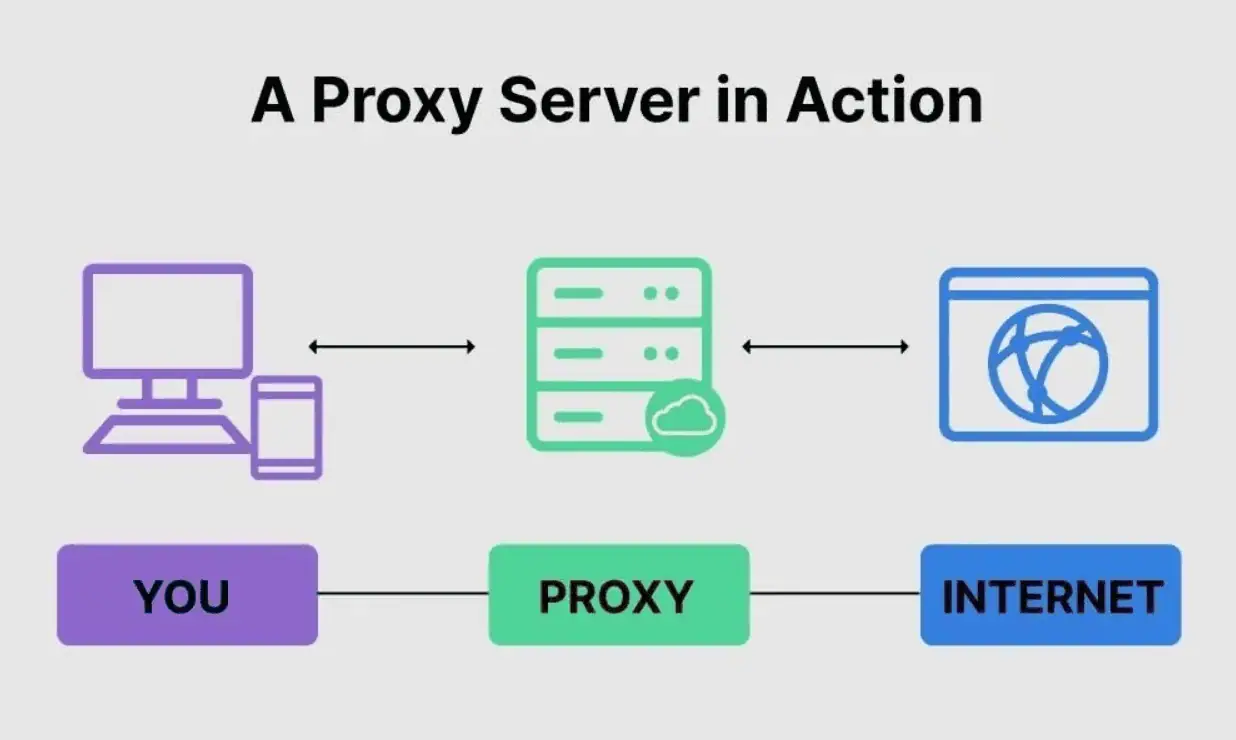
A proxy server is a dedicated system that operates as an intermediary between a user and a remote server on the internet.
It serves multiple purposes, including improving security and data privacy, distributing server load, accelerating access to resources, and bypassing restrictions on websites and services. A proxy can be implemented either as hardware or as software running on a server or local machine.
Who uses proxies and why are they needed?
Proxy servers are widely used by both individuals and organizations for different objectives.
- Individuals
- Private users rely on proxies to enhance online privacy and security. By masking IP addresses and locations, proxies help reduce risks such as tracking, hacking attempts, or identity exposure.
- Business organizations
- Companies use proxies to manage employee internet access, secure internal networks, and protect sensitive corporate data from unauthorized access.
- Internet providers
- ISPs implement proxies to cache frequently accessed content, improving loading speed and reducing bandwidth usage for users.
- Advertising networks
- Ad platforms may utilize proxies to analyze user behavior and deliver targeted advertisements.
- Government organizations
- Certain institutions use proxies to filter internet content, restrict access to specific resources, and monitor online activity.
How do proxy servers work?
A proxy server functions as a middle layer between a client and the internet.
When a user sends a request through a proxy, it is first directed to the proxy server. The proxy processes the request and forwards it to the destination server. Once the response is received, it is sent back to the user through the proxy.
Proxies can perform additional tasks such as hiding IP addresses, caching data, or enforcing access rules.
Let’s break down the process:
- The client sends a request to the proxy.
- The proxy checks whether the requested data is already stored in its cache. If available, it returns the data immediately. If not, it forwards the request to the target server.
- The destination server processes the request and sends a response back to the proxy.
- The proxy may filter, modify, or block the response before delivering it to the client.
Proxy protocols
Proxy protocols define how data is transmitted between the client and server. There are several common types, including HTTP, SOCKS, SSL, DNS, P2P, and VPN. Each protocol serves different purposes depending on user needs.
For example:
HTTP protocol
This is the most widely used protocol for handling web traffic. It supports caching, filtering, and request modification, and can restrict access to certain resources.
SOCKS protocol
Operating at the TCP/IP level, SOCKS supports multiple traffic types such as HTTP, FTP, and SMTP. It forwards data without altering it, making it suitable for flexible use cases.
SSL protocol
SSL/TLS proxies establish encrypted connections between client and server, protecting sensitive information during transmission.
DNS protocol
DNS proxies manage domain name requests and can redirect them, helping bypass restrictions or improve performance.
P2P protocol
These proxies are used in peer-to-peer networks, enabling secure and anonymous file sharing.
VPN protocol
VPN-based solutions create encrypted tunnels between client and server, offering strong privacy and the ability to bypass geographic restrictions.
What types of proxies exist?
Based on connection type, proxies can be categorized as follows:
HTTP proxy
Handles web traffic and is used for caching, load balancing, and improving security.
SOCKS proxy
A flexible option that supports various protocols and is suitable for bypassing restrictions and ensuring secure data transfer.
SSL proxy
Encrypts communication between client and server, protecting sensitive data such as credentials or payment details.
DNS proxy
Redirects DNS queries, helping bypass blocks and optimize network performance.
Ping proxy
Allows ICMP traffic, commonly used for testing server availability and diagnosing network issues.
FTP proxy
Designed for file transfer via FTP, improving security and efficiency in file exchange.
Transparent proxy
Works without user configuration and is often used in organizations to monitor and control internet usage.
Is it safe to use a proxy?
Using a proxy can improve security, but the level of protection depends on factors such as proxy type, configuration, and provider reliability.
While proxies can hide your IP and help bypass restrictions, they do not guarantee full anonymity. Additional tracking methods may still identify users.
Moreover, the proxy itself can become a point of vulnerability. If compromised, it may expose user data, including traffic and IP information. Not all proxies offer the same level of security, so choosing a reliable provider is essential.
How is a proxy different from a VPN?
Although both proxies and VPNs are used to improve privacy, they differ significantly in functionality.
Proxy server:
- Acts as an intermediary between client and server.
- Helps bypass restrictions.
- Can hide the user’s IP address.
- Provides limited protection.
- Does not encrypt traffic.
- May be vulnerable to attacks.
VPN:
- Creates a secure tunnel between client and server.
- Encrypts all transmitted data.
- Masks the user’s IP address.
- Offers stronger privacy and security.
- Bypasses geographic restrictions.
- May reduce speed due to encryption overhead.
Proxies and VPNs serve different purposes. For simple tasks like bypassing restrictions, a proxy is sufficient. For higher security requirements, a VPN is more appropriate.
How to choose a proxy server?
Selecting a proxy depends on your specific goals. Key factors include:
- Purpose of use
- Define your objective, whether it is bypassing restrictions, improving privacy, or handling automation tasks.
- Type of proxy
- Different proxy types are suited for different use cases, so choose accordingly.
- Server location
- Proximity affects speed and performance. Selecting servers closer to your target region can improve results.
- Price
- Free proxies often have limitations and risks, while paid options provide better performance and reliability.
- User feedback
- Reviews can help assess the quality and trustworthiness of a provider.
- Technical support
- Reliable support is important for resolving issues and ensuring smooth operation.
How to set up a proxy?
Configuring a proxy is generally straightforward, though steps vary by system and software.
Windows 10:
- Open Settings via Win + X.
- Go to Network and Internet.
- Select Proxy.
- Enable proxy usage and specify type (HTTP, SOCKS, etc.).
- Enter server address, port, and credentials if required.
macOS:
- Open System Settings and go to Network.
- Click Advanced.
- Select Proxies.
- Enable the desired proxy type.
- Enter connection details.
Google Chrome:
- Open the browser menu.
- Go to Settings.
- Navigate to Network.
- Open system proxy settings.
- Enter proxy details.
Mozilla Firefox:
- Open the menu and go to Settings.
- Navigate to Network settings.
- Configure proxy manually.
- Enter required parameters.
For precise instructions, refer to official documentation for your system or software.
Is it expensive to use a proxy?
The cost depends on the type of proxy you choose.
Free proxies are available but often suffer from slow speeds, lack of reliability, and potential security risks. They may also be blacklisted or used to collect user data.
Paid proxies vary in price but generally provide clear advantages:
- Exclusive access to IP addresses.
- Higher connection speeds.
- Stable performance.
- Reliable technical support.
Ultimately, the choice between free and paid solutions depends on your requirements, budget, and the level of reliability you need.


